Mean Reversion Strategy - Keltner Channels
Combining a Moving Average with the ATR to create Mean Reversion Keltner Channels
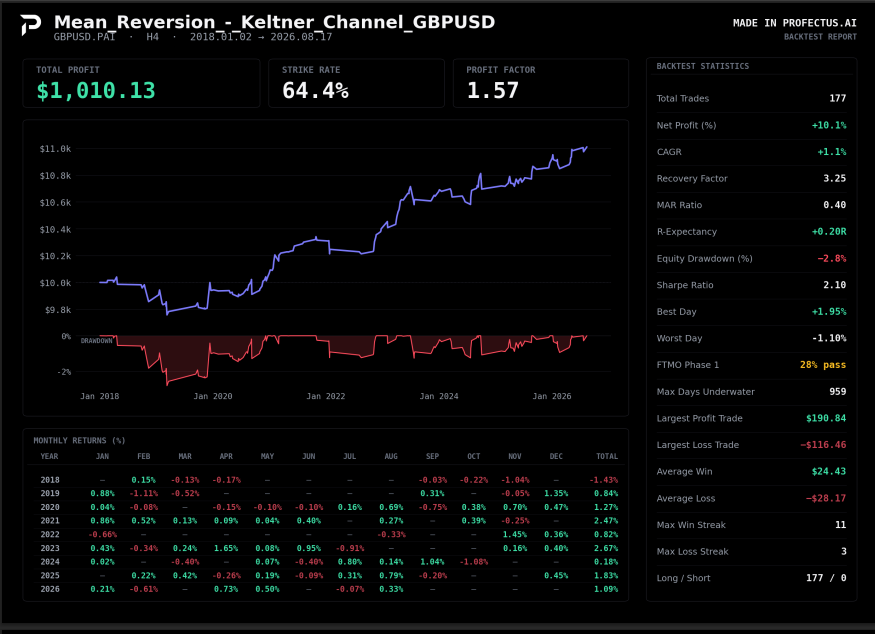
Keltner Channel Strategy
In this second article of the Mean Reversion series, we are going to go back to my initial example of utilizing a Moving Average to determine when price has moved too far from the mean. In very technical terms, we will be building a Keltner Channel.
A Keltner Channel is a volatility-based channel calculated from a Moving Average as a baseline. It’s used by adding and subtracting an ATR value to the Moving Average value to create an upper and lower band. In this example, today we will only focus on the lower band and will thus subtract an ATR value from the Moving Average to create the band.
Disclaimer: Templates are for educational purposes only!
👉 Get the Keltner Channel Template → Template Link
This template is designed to run on the 4-hour timeframe, with the example being on GBPUSD.
What Is The Keltner Channel Strategy
The Keltner Channel Strategy is a very typical mean reversion strategy that takes into consideration market volatility. The entry is determined by volatility because the ATR is involved in the calculation of the channel. We enter a trade when the long-term trend is up, but the price closes outside the Keltner Channel Lower Band. We use a rather large stop loss for the trade to give it enough room to breathe before reversing back to the mean. This stop loss is also based on volatility using the ATR.
As a result, if the market is ranging and volatility is low, the system will take more trades in a row and will have a higher win rate. Also, targets will be smaller, and thus you’ll have an asymmetric risk-to-reward ratio, mainly negative. However, if volatility picks up, we are looking at bigger moves, bigger stoploss sizes, but also more distance to cover before the trade can exit for a winner.
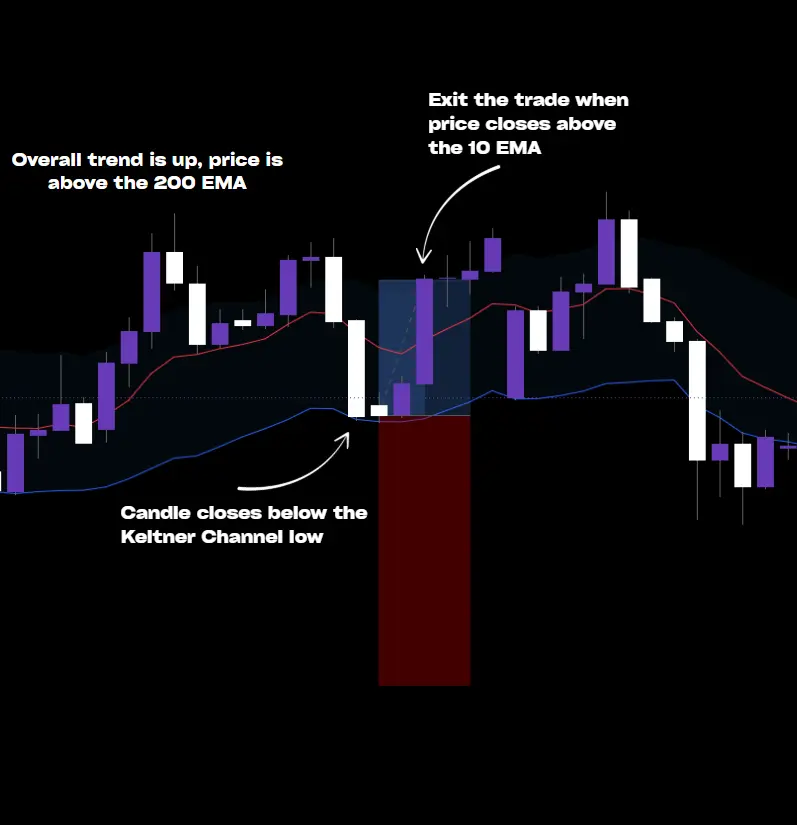
Let’s write down all the rules of this strategy, step-by-step.
- Once per bar, during the desired trading session (full day in our case), we calculate the Keltner Channel low. We do this by subtracting 1x ATR Period 10 from the EMA Period 10.
- We check the market for a candle close below the Keltner Channel low.
- We check the overall trend by looking if the previous candle closed above the 200-period EMA
- If there are no open trades and if there is no news scheduled within 15 minutes, we take a buy trade
- Trades have a stop loss at 5x ATR period 10 and no fixed target
- For the exit, we close the trade when a candle closes above the 10-period EMA
Pretty simple, right? Now let’s build it together in Profectus AI
Building the Mean Reversion Keltner Channel Strategy
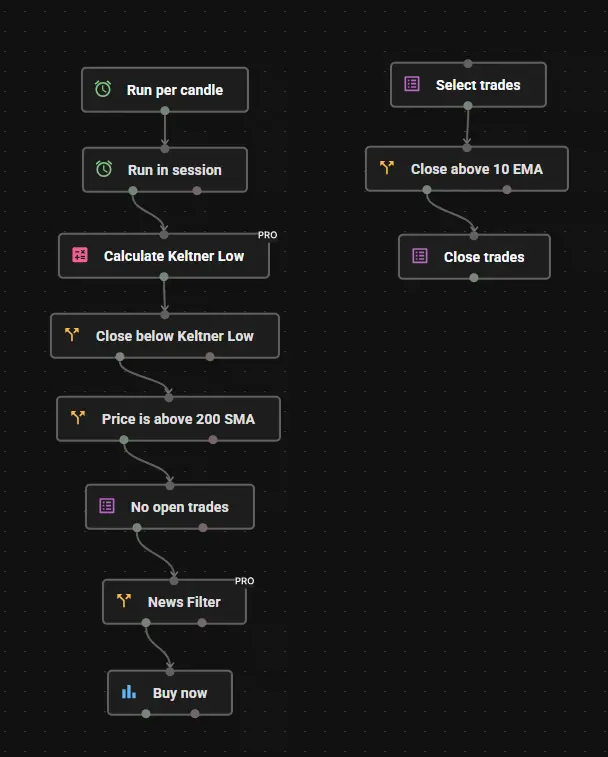
- Initiate the Variables. There is only 1 variable needed for this system. Create one variable named Keltner_low and give it a default value of 0
- Start with a Run Per Candle block and attach it to a Run In Session block. Set the time in the Session block to 01:00-22:00
- Calculate the Keltner Low. Take a formula block and connect it to the Run In Session block. In the formula block, you create the following formula:
Keltner_low = Indicator Moving Average Period 10 - Indicator Average True Range Period 10 - Find the Keltner Low Close. Connect a Trade Rule block and put:
Candle Close Candle ID 1 < Keltner_low - Find Overall Trend. Take another Trade Rule block and connect it to the previous one. We now check:
Candle Close Candle ID 1 > Indicator Moving Average, Period 200 - No open trades. Take a Count Trades block and put open trades = 0, open orders = 0
- News filter. Get the News Filter block and put the desired window where you don’t want to trade around high-impact news events.
- Buy Now. When all the conditions are true the buy now block executes and you put the following settings:
Risk = Risk % of balance 1 (by default, change to your liking)
Stop loss = Indicator, Average True Range (Period 10), Adjust *5
Take Profit = none - In a new tree, the exit module. Start with a Select Trades block and select the Open Trades
- Check the 10 EMA Cross. Connect a Trade Rule block and check:
Candle Close Candle ID 1 > Indicator Moving Average (period 10) - Close trades. Connect a Close Trades block to exit the trade.
Get Access to the Keltner Channel Mean Reversion Strategy
Want to see how the Keltner Strategy works when fully automated?
Access the automation template used to turn this trading concept into a deployable MQ5 trading bot inside Profectus AI. The template includes the entry logic and the trade close module. It’s ready for testing!
You can test it on different symbols, adjust the timeframe, change the session window, and change the floating parameters for entering and exiting the trade.
Disclaimer: Templates are for educational purposes only!
👉 Get the Keltner Channel Template → Template Link
This template is designed to run on the 4-hour timeframe, with the example being on GBPUSD
Other related blog posts
Dive into a world of knowledge, trends, and industry updates on the Variable blog. Our curated content covers a spectrum of topics.
.webp)