How to Protect Your Prop Firm Account
In Profectus AI, you can protect yourself from violating prop firm rules with our Prop Firm Protection modules.
Prop Firm Rules Protection
We are traders, and we know the importance of keeping your funded prop firm trading accounts. You have worked tediously to pass the challenge, and now you want to make sure you are not violating any rules that could lead to you losing the funded account. In Profectus AI, you can protect yourself with our Prop Firm Protection modules so you don’t risk violating rules relating to:
-Trading through and around high-impact news events
-Breaching the maximum Daily drawdown
-Holding trades over the weekend
And some more. In this article, we walk you through modules you can easily add to your strategies to help protect yourself from accidentally violating key prop firm rules.
No trading around news events
A very common rule set by prop firms is:
“You cannot open or close trades (including Stop Loss or Take Profit) 2 minutes before to 2 minutes after major macroeconomic releases affecting those specific currencies.”
The times vary between prop firms, but the essence is the same. No trading is allowed around high-impact news events that affect the currencies you are trading. For this, we have created the News Filter, and we will quickly walk through the setup of the News Filter to adhere to this specific rule.
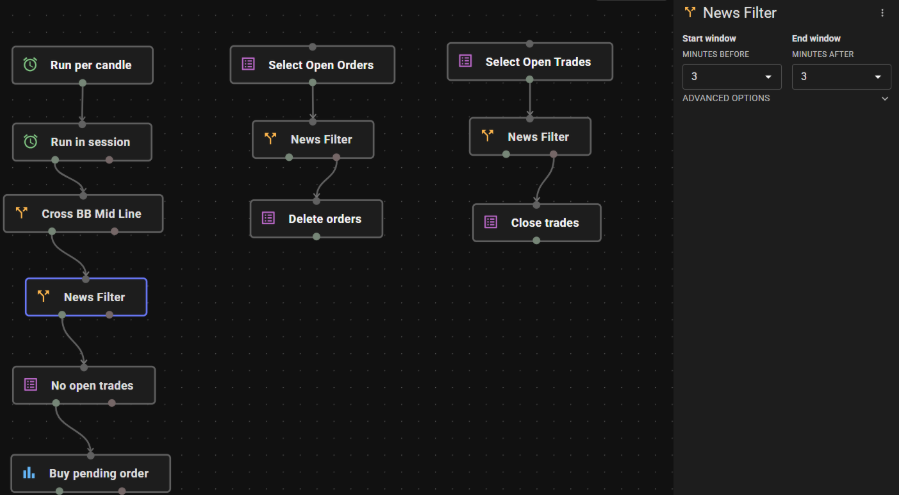
Let’s walk through this setup so we cover the full protection from breaking any news-related prop firm rule.
- No placing new trades 3 minutes before and 3 minutes after high-impact news. I have attached a News Filter block before placing the pending order in the Breakout Template. This block now makes sure that no new buy pending orders are placed 3 minutes before, and 3 minutes after a high-impact news event.
- Deleting pending orders 3 minutes before high-impact news. If you have a pending order that is not yet triggered, you don’t want to risk this order getting activated just before or on the news event and thus violating the news trading rule. The branch with the 3 blocks in the middle makes sure all open pending orders are deleted before the prohibited news window.
Select Open Orders block (pending orders) -> News Filter block (false output connection) -> Delete orders - Close open trades 3 minutes before high-impact news. If you have any open trades before a high-impact news event comes along, this module makes sure they are being closed, in this case 3 minutes before the news event. You can adjust this time obviously, to fit the rules of your prop firm.
Select Open Trades block (open trades) -> News Filter block (false output connection) -> Close trades
No holding trades over the weekend
Another common rule in the prop firm industry is that it’s not allowed to keep trades open over the weekend. This is to protect the prop firm from gap risk and obviously, to obstruct your trading.
However, we can create a very simple module to adhere to this rule by simply closing all trades on Friday evening 8pm (London time) and deleting all orders as well.
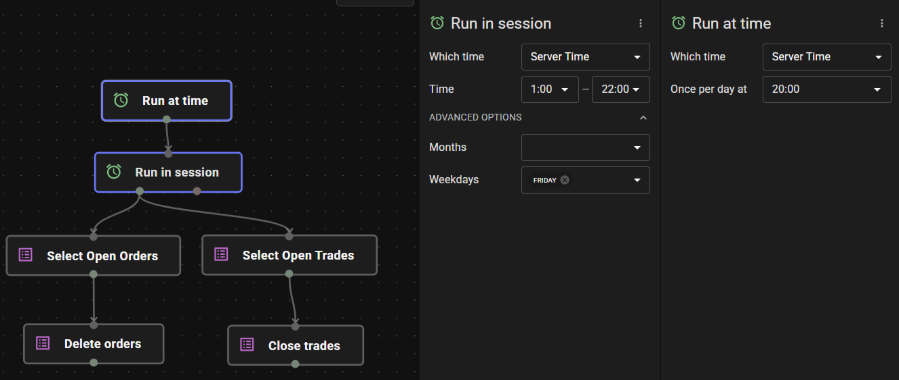
Run at time block (once per day at 20:00 Server Time) -> Run in session block (between 1:00 and 22:00, Weekdays: Friday only -> Select Open Orders & Select Open trades -> Delete orders & close trades
It’s a very simple module, and don’t forget to make the Run in Session block filter out the Weekday Friday only and to make it run between 1:00 and 22:00 to get the Run at time 20:00 stamp included in the filter.
Maximum Daily Drawdown Protection
One of the more strict rules many prop firms apply is the maximum daily drawdown rule. This rule can look like this:
“The maximum daily loss/drawdown cannot exceed 5% of the initial account balance”
If you have a 100k prop firm account, that means the maximum daily drawdown (sometimes named daily loss) cannot exceed 5k. That is based on equity and thus also includes floating losses.
Let’s create the module to protect yourself from breaching this maximum daily drawdown limit.
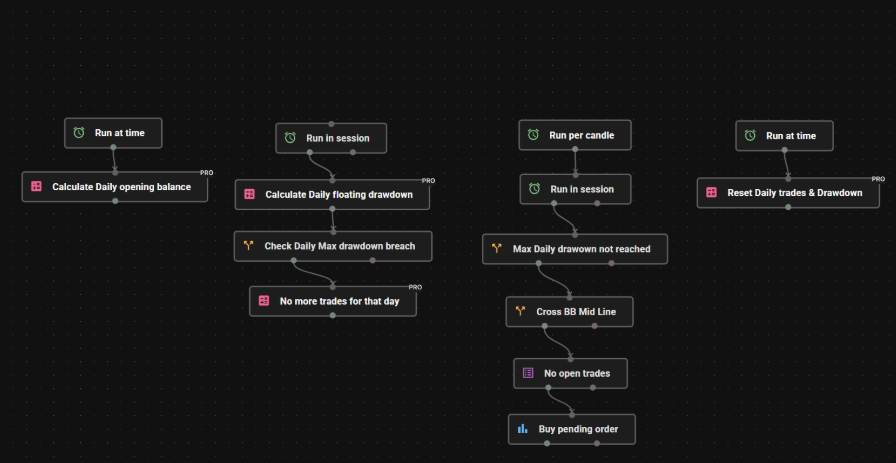
- Initiate the variables. Let’s start by initiating 3 variables:
balance_open
floating_drawdown
daily_trade_limit
Default values are 0 for each - Calculate the opening balance. The daily drawdown is always calculated on the opening balance for the day (the balance at time of market open). We calculate this and assign it to the variable balance_open.
Run at time (01:00) -> Modify Variable. Balance open = Account (Balance) - Calculate the floating drawdown. Throughout the trading day we constantly measure the account equity against the balance_open. This figure is stored in the variable floating_drawdown.We then use a Trade Rule block to measure if floating_drawdown => maximum daily drawdown (you put the maximum daily loss amount here, let’s say 5000)
The last step here is to modify the variable daily_trade_limit to value 1 if the Trade Rule is true. This is the variable that will stop the trading for the day when applied in the next step.
- Check if the maximum daily drawdown is reached or not. In your normal trading strategy, preferably before the normal strategy rules, put a Trade Rule block that checks:
Daily_trade_limit = 0
This means the rest of the strategy and the trade executions will only pass if the maximum daily drawdown has not been reached.
- Reset the variables end of day. At the end of each day, at 22:00 server time, you can reset all 3 variables back to their default value 0 so the process can start from scratch again at market open the next day.
Stop trading when profit target is reached
Imagine, you are in a handful of trades while you are asleep. You are not far off from your profit target and while you are in bed the combined floating profits of all your positions reach beyond the profit target for necessary for passing the challenge or verification phase for your prop firm account. You want to close all the trades, stop trading and get to the next step of your prop firm adventure.
We build a very simple module to do just that. It checks the account equity against the profit target amount (filled out by you in the inputs), and it will automatically close all the open trades, delete open pending orders, and will instruct the EA not to open anymore trades.
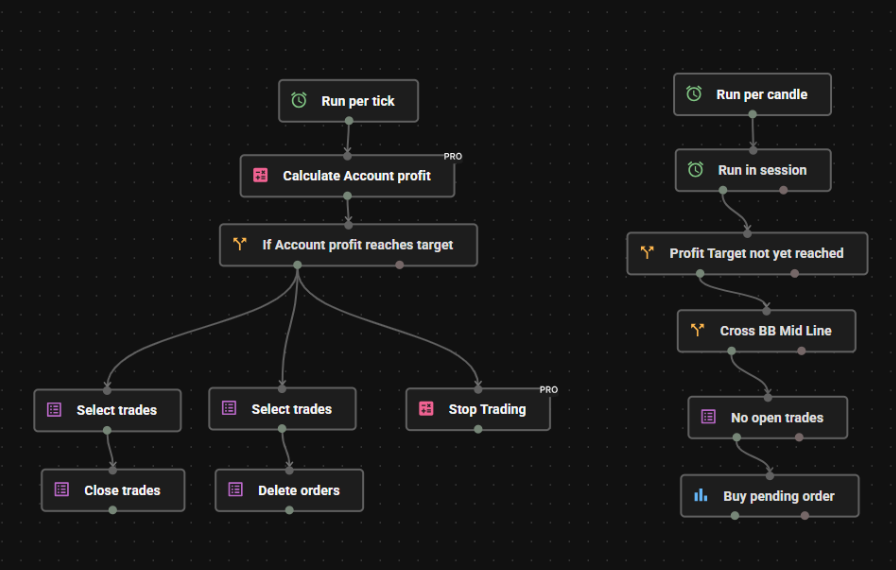
Let’s run through the blocks together
- Initiate the variables. As always we first set up the variables we need. This time we also set 2 input values to specify the profit target and fresh starting balance.
floating_profit
target_reached
profit_target (input)
starting_balance (input)
All values have a default value of 0 except for the Inputs. You put the profit target you want here in dollar amount. So if you need 10% profit on a 100k account, you put 10000. For the starting balance you put the starting balance of the challenge, in this particular example it would be 100000.
- Calculate floating profits. We use a run per tick block to get immediate updates on the floating profits and to let the EA stop trading when the target has been reached.
Run per tick -> Formula block:
floating_profit = Account equity (Account -> Equity) - starting_balance - Check if profit target is reached. Use a trade rule block to check if the floating profit exceeds the profit target.
floating_profit => profit_target - Remove trades, orders & stop trading. You now connect 2 select trades blocks, one with setting Open Trades and the other with setting Pending Orders. Attach the Close Trades and Delete orders blocks to the select trades blocks. And you attach one Modify Variable block to modify:
target _reached = 1 - Apply the stop trading module in your EA. Finally, in your EA, before running the trading logic add one Trade Rule block that simply checks:
target_reached = 0
This means the EA will only continue to run and place trades if the profit target has NOT yet been reached
Conclusion
You have now learned how to build a selection of modules to protect yourself against some of the strict rules set by prop firms. It’s a valuable toolkit that can bring a lot of peace of mind when you are trying to pass prop firm challenges or when you’re actually trading a funded account. Happy building & trading!
Other related blog posts
Dive into a world of knowledge, trends, and industry updates on the Variable blog. Our curated content covers a spectrum of topics.
.webp)