How to Automate Futures Trading
Learn how you can automate trading futures with Profectus AI
How to Automate Futures Trading on Prop Firm Accounts
Most futures traders still trade manually. They sit behind their charts, wait for opportunities, and execute their trades whenever their strategy gives them a signal. That is also why automated futures trading is such an interesting opportunity. What if you could take the strategies you normally trade by hand, turn them into algorithms, and let them trade automatically on your own futures account or even your futures prop firm accounts?
For years, we've been building and trading automated strategies in the forex and crypto markets. Now, we're also exploring how to deploy those same types of algorithms in the futures market. The idea is not necessarily to create completely new strategies, but to find new opportunities for those strategies that we’ve already automated in Profectus.
The big challenge, however, is that the futures space operates on very different platforms and exchanges from what we’re used to in forex. We build our algorithms for MetaTrader 5, while a lot of futures traders trade on Tradovate or NinjaTrader.
In this article, I'll walk you through the process, from selecting and analyzing your strategies in Profectus AI to using a copy trading platform to run them on a futures trading prop firm account or trading account.
For a visual walkthrough, you can also watch the full YouTube tutorial here.
What Do You Need to Automate Futures Trading?
The setup is quite similar to running a normal Expert Advisor on a forex trading account. The main difference is that we need an additional connection between MetaTrader 5 and the platform used by our futures prop firm.
This is a creative workaround that saves you from having to learn a new trading platform and allows your Profectus MT5 algorithms to run in the futures markets.
The entire setup looks like this:
Profectus AI → MetaTrader 5 → Trade Copier → Futures Prop Firm Account
Let's go through each part.
Building and Backtesting Your Strategies in Profectus AI
Before connecting any trading accounts, we first need a strategy that we actually want to trade.
In the video, I'm using three automated strategies that we previously developed for stock index trading. One of them is the MA Open strategy, a momentum-based system designed to capitalize on strong directional moves.
Disclaimer: Templates are for educational purposes only!
👉 Get the S&P 500 Momentum Strategy Template → Template Link
This template is designed to run on the 5-minute timeframe.
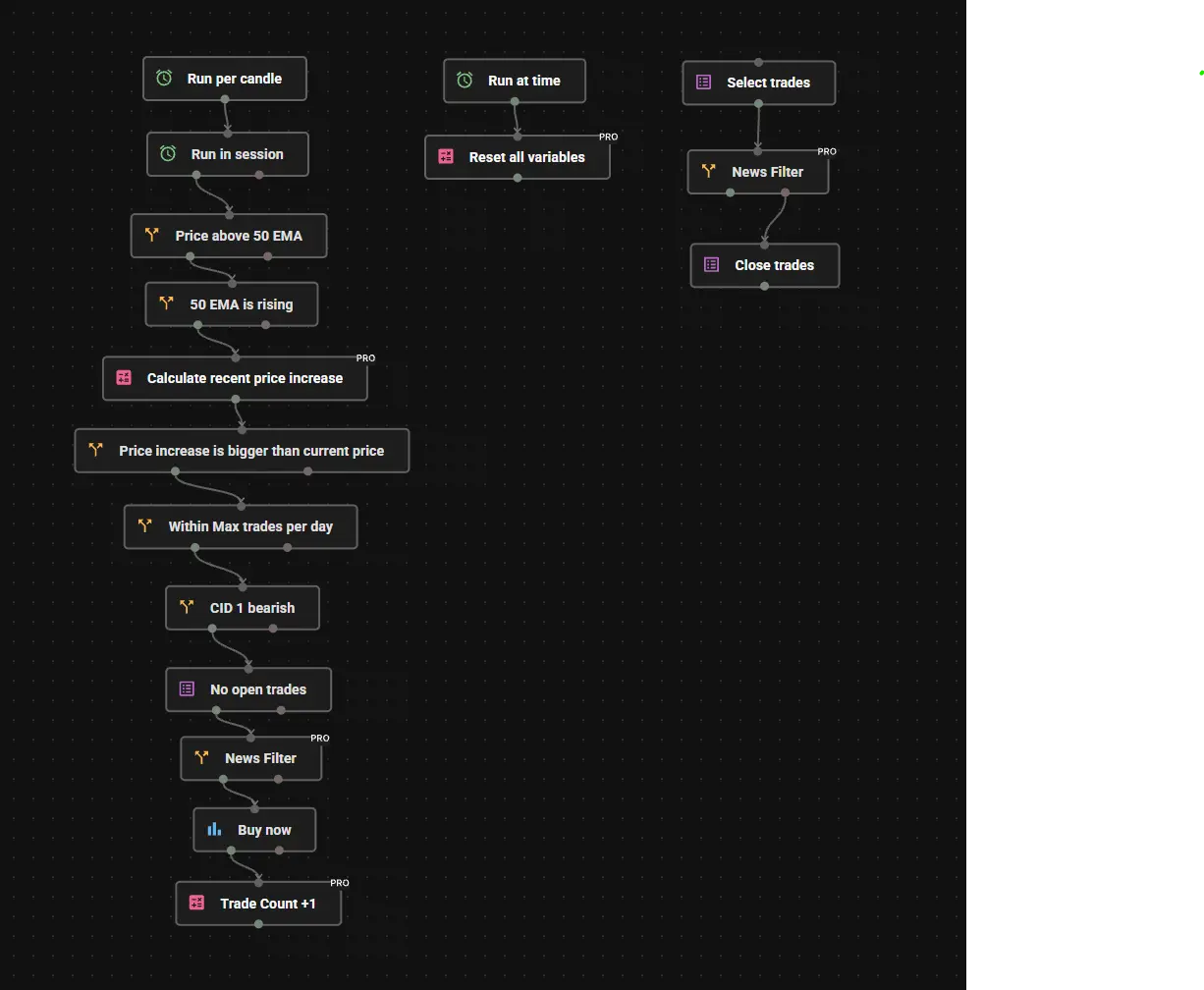
This strategy is particularly interesting because it was already designed for the US500 index CFD. That means we can apply the same logic to the S&P 500 futures. Before deploying a strategy, we want to understand how it performs over a sufficiently long historical period. We want to see the equity curve, the distribution of winning and losing trades, the maximum drawdown, and preferably hundreds of historical trading examples across different market conditions.
In Profectus AI, you can build and test strategies using the visual builder and backtesting tools available for supported markets. Actual futures contracts for the ES (S&P 500) and the NQ (Nasdaq) can be tested directly within Profectus AI soon!
Once the strategy is ready, you can download it as an EX5 file, the executable format used by MetaTrader 5.
Analyzing the Strategies as a Portfolio
Before moving to MetaTrader 5, I want to briefly look at how the three strategies perform together.
Rather than testing only one algorithm, we're combining three systems: two designed for the S&P 500 and one for the Nasdaq. The idea is to create a small portfolio that can trade multiple opportunities instead of relying entirely on one strategy.
In the video, the backtests cover approximately 2019 to 2026, with around 2,500 historical trades across the portfolio. That's a useful amount of data to start analyzing how the systems behave, although the sample size alone doesn't guarantee the strategies will remain profitable.
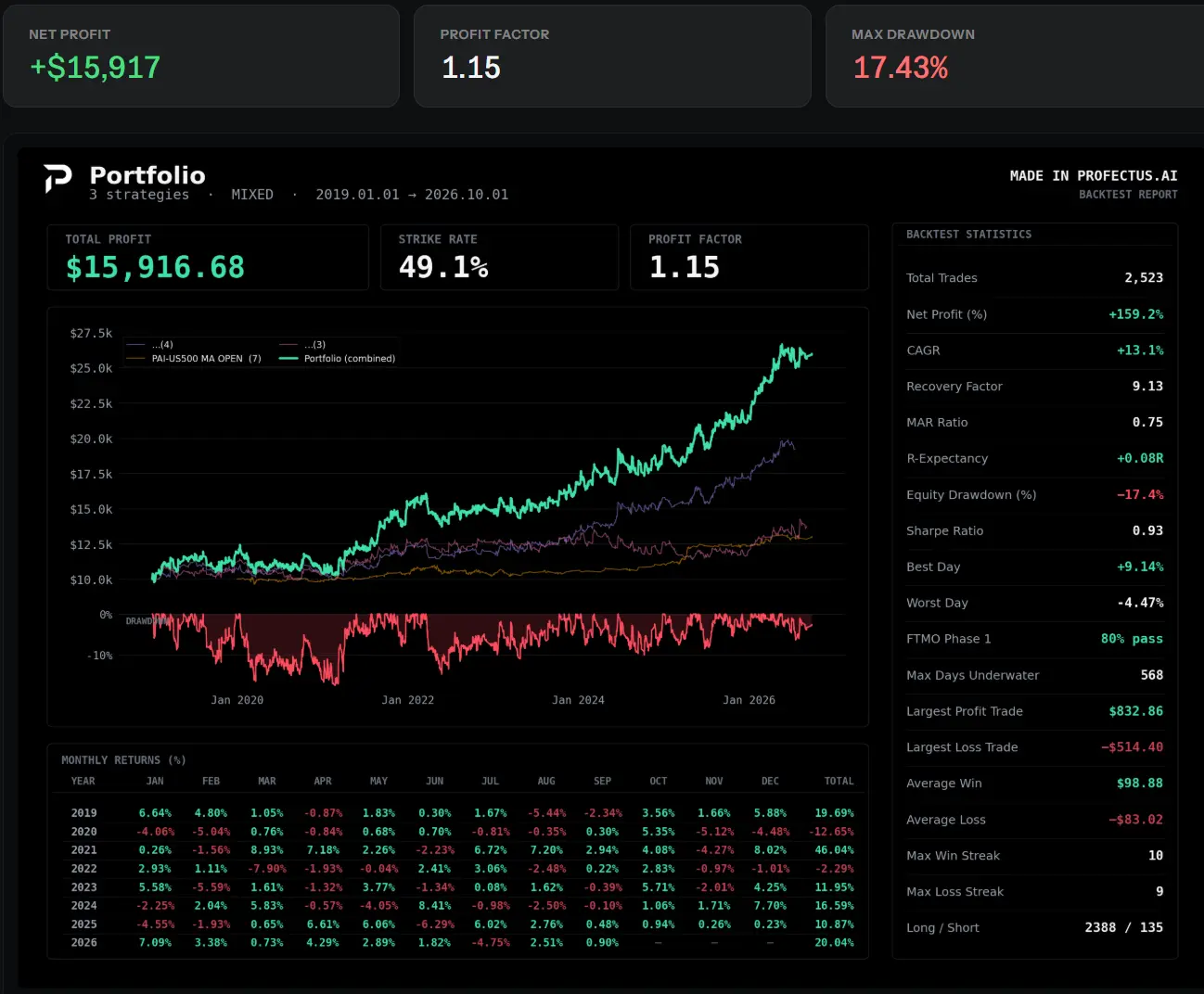
The three strategies in this example have shown promising historical performance, but I'm not treating them as finished systems yet. The goal is also to gain practical experience with the futures market, understand how the algorithms execute through the broker, and compare the results with what we expect from the backtests.
Connecting Your Strategies to a Futures Broker in MetaTrader 5
Now that we have our strategies, we need a trading platform where the algorithms can run. For this setup, we're using MetaTrader 5. The main reason is simple: Profectus AI exports strategies as MetaTrader 5 Expert Advisors, so MT5 provides the environment where our algorithms can monitor prices and execute trades.
The next requirement is an MT5-compatible broker that offers access to futures markets. In the video, I discuss two examples: AvaFutures and AMP Futures. Both offer access to futures trading through MetaTrader 5, although account availability, instruments, and trading conditions can vary.
For the example, I chose AvaFutures because I wanted to start with a demo account and test the setup without putting money at risk. This isn't a broker recommendation or an affiliate partnership; it's simply the broker used to demonstrate the workflow.
Let's quickly go through the setup:
- Download your EAs from Profectus AI. Export each completed strategy as an EX5 file.
- Install and open MetaTrader 5. Log in using the credentials from your futures-compatible broker account.
- Import your Expert Advisors. In MetaTrader 5, go to File → Open Data Folder → MQL5 → Experts and place your EX5 files inside the folder. Refresh the Navigator panel if they don't appear automatically.
- Open the correct charts. Select the instruments and timeframes your algorithms were designed for. In our example, we're using 5-minute charts for the S&P 500 Micro contract and Nasdaq Micro Contract.
- Attach the EAs and enable algorithmic trading. Drag each Expert Advisor onto its chart, review the inputs, and enable Algo Trading. Check that the strategies have initialized correctly.
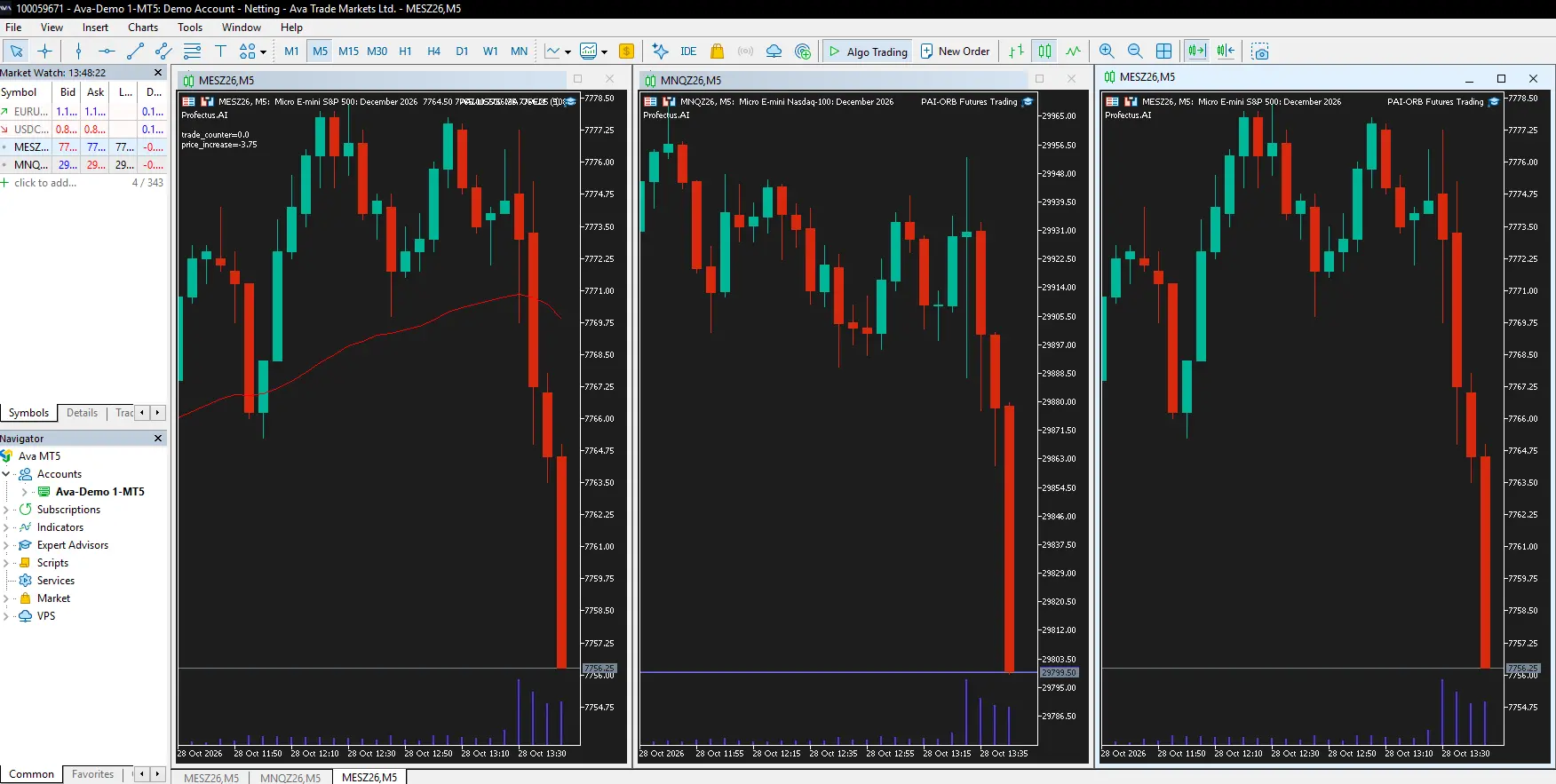
One important detail is that futures contracts are not identical to index CFDs, even when they track the same underlying index. A Nasdaq CFD and a CME Nasdaq futures contract can have different prices, trading hours, contract sizes, and execution costs. You therefore need to verify the exact instrument and order sizing before copying trades between them.
For example, copying a 0.1-lot trade from one broker does not necessarily mean opening 0.1 futures contracts on the receiving account. Futures are normally traded in whole contracts, and the copier needs to translate the original signal into the correct number of contracts.
Connecting MetaTrader 5 to a Futures Prop Firm Account
Our algorithms are now running in MetaTrader 5, but many futures prop firms don't use MT5 as their primary trading platform. Instead, they provide accounts through platforms such as Tradovate. Fortunately, that doesn't mean we have to rebuild every algorithm for a completely different trading platform. We can use a trade copier to connect the two environments.
A trade copier acts as a bridge between your main trading account and one or more receiving accounts. Whenever the algorithm opens a trade on your main MT5 account, the copier detects the order and sends the corresponding instruction to the connected futures account.
In the video, I discuss two services that support this type of connection: Copygram and Traders Connect. Both offer trading-account connectivity across different platforms, including MetaTrader and Tradovate.
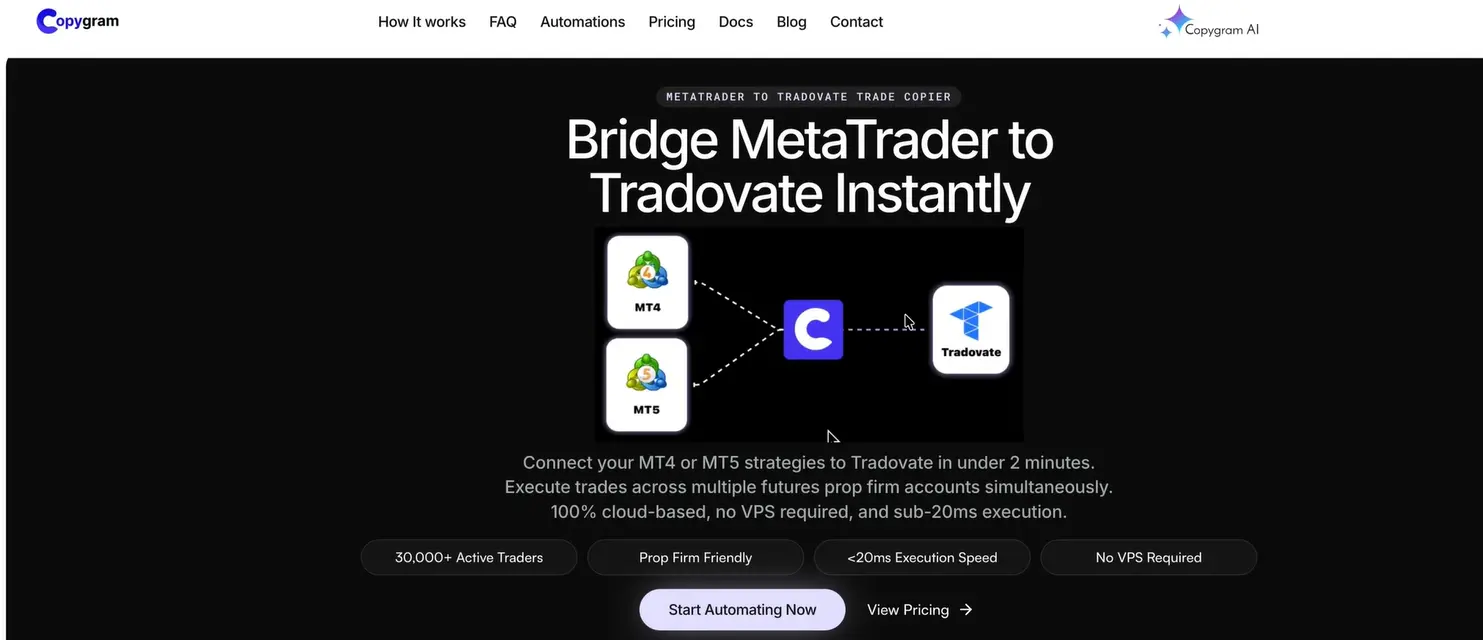
For example, imagine your algorithm identifies a buying opportunity on the S&P 500. The EA opens a position in MetaTrader 5, and the copier sends the corresponding buy instruction to your Tradovate account. If the strategy later closes the position, that closing instruction can also be forwarded to the futures account.
This allows you to run your algorithms in one place while executing their trades across multiple accounts.
It's a setup I've also used with forex prop firm accounts, where trades from a main account are copied to other accounts rather than running separate versions of every algorithm everywhere.
There are a few important things to check, however. The copier needs to support both platforms, the correct futures symbols must be mapped, and the position size must be appropriate for each account. You should also test how it handles stop losses, take profits, partial closes, and order modifications.
Finally, always check whether your particular prop firm allows Expert Advisors and trade copying.
Keeping Your Algorithms Running With a VPS
There is one more practical consideration before the setup is complete.
Your Expert Advisors need an active trading environment to keep monitoring the market. If you run MetaTrader 5 on your laptop and then turn the laptop off, the algorithms stop running. That means they can miss opportunities until MetaTrader is opened again.
We discussed this thoroughly in last week’s article; make sure to read this if you want a better explanation of running your systems on a VPS.
The important thing is to ensure that both the strategy execution and the trade-copying process remain operational when your personal computer is turned off.
Why Automated Futures Trading Is Interesting
For me, one of the biggest advantages of automated trading is that once you have built and tested a strategy, you can run it without constantly sitting behind your charts.
That is already useful in forex and crypto, but the futures market adds another interesting area to explore. You have highly liquid markets such as the S&P 500 and Nasdaq futures, different contract sizes, and a large ecosystem of traders and prop firms.
At the same time, many futures traders still approach the market manually. Turning those trading ideas into systematic rules allows you to backtest them, remove some of the emotional decision-making, and execute strategies consistently. Of course, automation is not a shortcut to profitability. A losing strategy will still lose money when automated, and a profitable backtest does not guarantee that the same strategy will perform well on live futures data. In fact, automation can magnify mistakes if your position sizing, symbol mapping, or risk controls are configured incorrectly.
👉 Start building your automated trading strategies with Profectus AI.
For a complete visual walkthrough of the futures trading setup, you can also watch the full YouTube tutorial here.
Other related blog posts
Dive into a world of knowledge, trends, and industry updates on the Variable blog. Our curated content covers a spectrum of topics.
.webp)